

JAVA 8 FEATURES
Java 8 launched today and it’s a groundbreaking release since Java 1.2. Although Java 5 brings big features but Java 8, as a whole, is really an enormous step for the Java language and platform.
Java 8 is the first truly revolutionary release we’ve done in a very long time
- Mark Reinhold (chief architect of the Java Platform)
Formal support of Lambda expressions, the Stream API and Functional Interfaces are spectacular improvements to java platform that allows developers to take advantage of multicore processors. Other than that new Date Time API, new JavaScript Engine, Compact Profiling, annotations and concurrency enhancements are impressive improvements.

Java 8 Features
Language and Platform Features
Lambda Expressions
Aka closures, enable developers to encapsulate a single unit of behavior and pass it to other code. Its like syntactic sugar for an anonymous class (with one method whose type is inferred) and is an object-less method or anonymous method. Its the most dominant feature of Java 8 and will have great implications for simplifying development. Behind the seen it is not an anonymous class; it actually uses invokedynamic in the byte-code.
Stream & Bulk Data Operations
Represents a sequence of objects, somewhat like the Iterator. However, unlike the Iterator, it supports parallel execution. Classes in the new java.util.stream package provide a Stream API to support functional-style operations on streams of elements. The Stream API is integrated into the Collections API, which enables bulk operations on collections, such as sequential or parallel map-reduce transformations.
Functional Interface
Its defined as an interface with exactly one (non default) method. This concept also applicable to interfaces that were created with earlier Java version. Java 8 comes with several functional interfaces in package,java.util.function.
Method Reference
As its title are reference to some method. Java 8 allow developers to refer any existing method or anonymous method (Lambda) as well. Method references can point to static methods, instance methods, particular object/instance methods and constructors.
Default Method
Aka Defender Methods or Virtual Extension methods, now adds support for multiple inheritance in java(multiple inheritance of implementation more precisely). It help API authors to add new methods to an interface without breaking the old code that already using the actual interface.
Type Annotations
(Annotations on Types) extends the set of annotatable locations, now developers are allowed to use annotations along with the use of a type. This new ability is primarily aimed at supporting type-checking frameworks that refine Java’s built-in type system.
Repeating Annotations
These provide the ability to apply the same annotation type more than once to the same declaration or type use. Improve the readability of source code which logically applies multiple instances of the same annotation type to a given program element.
Generalized Target-Type Inference
It expands the scope of method type-inference to support (1) inference in method context and (2) inference in chained calls. Now developers need not to manually specify type-parameters on chained callas, method call in some expressions.
Method parameter reflection
provide a mechanism to easily and reliably retrieve the parameter names of methods and constructors at runtime via core reflection. It allow to improve IDE capabilities by making parameter names more widely available.
New Date/Time API
is thread-safe, easier to read, and more comprehensive than the previous API. It will make developers more productive, whether they are using the global date and time standards or one of the regional calendars.
Base64
encoding/decoding provides a standard built-in API for encoding/decoding resources. URL Base64 Encoder provides an encoding that is URL and Filename safe.
Compact Profiles & Small VM
allow developers to use just a customized subset of the platform, and is a major step toward the merging of Java SE and Java ME. It opens horizons to work on the smallest embedded Internet of Things (IoT) devices to enterprise servers in the cloud. Small VM feature support the creation of a small VM that is no larger than 3MB.
Nashorn
replaces Rhino as the default JavaScript engine and intend to provide a version of JavaScript that would run as part of JVM. The new script engine allow to import packages, use and even extend Java classes inside JavaScript, and invoke JavaScript functions directly from Java as well.
PermGen
removed from the Hotspot JVM. Class meta-data in native memory and move interned Strings and class statics to the Java heap. The code for the permanent generation in the Hotspot JVM will be removed.
JavaFX 8
is now available for ARM platforms. JavaFX is now integrated in Java SE, developers can use the java command-line launches JavaFX applications. It also allow developers to embed Swing content into JavaFX applications.
Miscellaneous
There are many other new concepts and improvements in the platform like Concurrency API improvements, preparation for modularization (Jigsaw), Statically-Linked JNI Libraries, Parallel Array Sorting, Internationalization improvements, JDBC-ODBC Bridge removal, addition of new tools, enhancements in some existing tools and many more.
Backports
for some of these exciting features are available in market. If due to some reason application can’t immediately be upgraded to Java 8, developers can still spice their code with these exciting features to previous versions of Java. For each of the following features, here is the backport or similar library:
- Lambdas – Retrolambda
- Lazily Evaluated Sequences – totallylazy
- Optional – guava
- Date/Time – ThreeTen
- Nashorn – nashorn-backport
Source : http://zishanbilal.com/
7 Super Useful Application Servers For Developers
Application servers are usually essential software frameworks that are used by developers. There are many of these that are available. Here are some of the more important ones that are used popularly.
1. Wildfly or JBoss Application Server
This is an application server authoured by JBoss and developed currently by Red Hat. It has been written in Java and runs on multiple platforms.
2. Zope
This is a free and open source web application server that has been written it Pytthon.
Apache Geronimo is an open source server runtime that integrates the best open source projects to create Java/OSGi server runtimes that meet the needs of enterprise developers and system administrators. Our most popular distribution is a fully certified Java EE 6 application server runtime.
4. GlassFish
This is an open source application server, which is also the official reference implementation for Servlets 3.0.
According to their website, this is "the fastest PHP server around".
6. JOnAS
JOnAS is a leading edge Java EE 6 Web Profile certified Open Source OSGi Enterprise Server developed by Bull and OW2. (Official Website)
7. Jetty
Jetty provides a Web server and javax.servlet container, plus support for SPDY, WebSocket, OSGi, JMX, JNDI, JAAS and many other integrations. These components are open source and available for commercial use and distribution. (Official Website)
Source : http://www.showsites.org/sites/developerfeed.blogspot.in
Variadic Objective-C Functions ( variable function parameters )
What are variadic functions?
Well, to be honest, I wasn’t exactly sure the name of these kinds of functions for years after I started programming. Just knowing the terminology will make your life a lot easier when googling for this same kind of thing in different programming languages.
In computer programming, a variadic function is a function of indefinite arity, i.e., one which accepts a variable number of arguments. Support for variadic functions differs widely among programming languages. (stolen from Wikipedia)
In the simplest of terms, it is a function that takes any number of arguments vs a function that takes a defined number of arguments.
iOS Library usage
There are multiple places that you run into variadic functions when doing iOS development. They are fairly simple to understand and use. The variable parameter can contain a comma seperated list of values and must be Nil terminated. Example below demonstratest creating a UIAlertView without any syntax
UIAlertView* alert = [[UIAlertView alloc] initWithTitle:@"Title"
                                                message:@"Message"
                                               delegate:nil
                                      cancelButtonTitle:@"Cancel"
                                      otherButtonTitles:@"OK", @"Ignore", nil];
Implementing your own Variadic function
Using these functions is simpler than creating your own function that accepts a variable parameter. Much of the syntax and usage is inherited from C, so it may seem a little bit foreign if Objective-C is all you know. Example below demonstrates sorting any number of NSString’s.
-(NSArray*) sort:(NSString*) values, ...

    NSMutableArray* sortableItems = [[NSMutableArray alloc] init];

    if( values == nil )
        return sortableItems;

    va_list args;
    va_start(args, values);

    NSString* str = values;
    do

        [sortableItems addObject:str];

    while( (str = va_arg(args,NSString*)) );

    va_end(args);

    return [sortableItems sortedArrayUsingSelector:@selector(caseInsensitiveCompare:)];
Explanation
The first thing to notice is the method definition. This is just syntax, but the ... signifies that this is a variable argument. The second thing is the nil check, values will always be a pointer to the first element of the variable argument, if the first element is nil we simply return an empty array.
The c-style stuff comes into play when you reach the va_list line. It is pretty simple, but you create a va_list and start reading from that list using va_start. I used a do , while loop because the va_arg function will move the pointer, and I wanted access to the first item. After you are done, of course, call va_end.
That’s all there is to making variadic functions in iOS
Source : http://www.showsites.org/sites/alexboyd.me
Website Speed Tests
You can run simple tests or perform advanced testing including multi-step transactions, video capture, content blocking and much more. Your results will provide rich diagnostic information including resource loading waterfall charts, Page Speed optimization checks and suggestions for improvements.
Nobody Likes a Slow Website
We built this Website Speed Test to help you analyze the load speed of your websites and learn how to make them faster. It lets you identify what about a web page is fast, slow, too big, what best practices you’re not following, and so on. We have tried to make it useful both to experts and novices alike.
In short, we wanted it to be a easy-to-use tool to help webmasters and web developers everywhere optimize the performance of their websites.
Before your customers enter your ecommerce store, they’re waiting for it to load. Page load time is the lapsed time between the moment a user requests a new page and when that page is fully rendered by the browser. Reducing page load times can reduce bounce rates and increase conversion rates.
Here is a free tools to test your page load time. There are simple speed tests, comprehensive tests with simulated traffic from around the globe, and multiple-site tests for head-to-head comparisons. Several of these tools offer suggestions to improve a site’s performance.
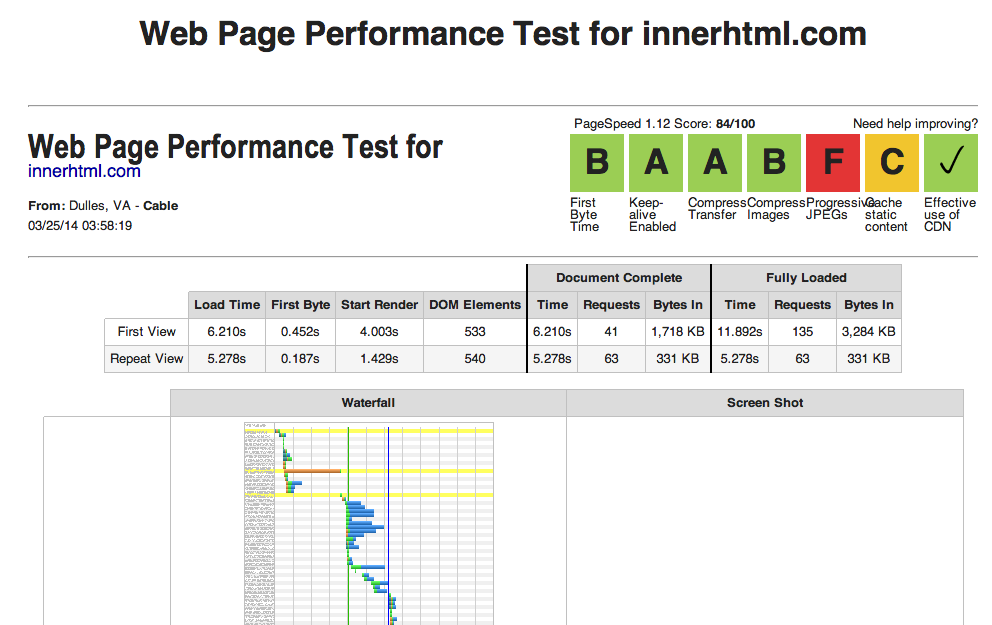
Feature Overview
Rating about : PageSpeed Score , First Byte Time, Keep-Alive Enable, Compress Transfer, Compress Images, Cache static content, Effective use of CDN
Examine all parts of a web page – View Load Times, Start Render, DOM Elements, Document Complete and Fully Loaded( Time, Request, Bytes) and other details about every single element of a web page (HTML, JavaScript and CSS files, images, etc.) at First View and Repeat View. You can sort and filter this list in different ways to identify performance bottlenecks.
Content breakdown by MIME type : List of MIME type, quantity of requests, amount of bytes for MIME type at First View and Repeat View
Connection View : View list MIME type from Start Render to Document Complete with CPU Utilization and BandwidthIn of each process connection
Full Optimization checklist : Performance Review about list of MIME type like : Keep-Alive, Gzip, Compress Img, Progressive, Cache Static, CDN Detected.
Share your results – We’ve made it easy for you to perform a test and share it with your friends, work colleagues or web host.
How it works
All tests are done with real web browsers, so the results match the end-user experience exactly. We use a bunch of instances of Google’s Chrome web browser to load websites, record performance data, and so on. Tests are done from dedicated Pingdom servers.
If you have any performance/optimization questions you can send email for us where industry experts regularly discuss Web Performance Optimization.
Website Speed Tests
You can run simple tests or perform advanced testing including multi-step transactions, video capture, content blocking and much more. Your results will provide rich diagnostic information including resource loading waterfall charts, Page Speed optimization checks and suggestions for improvements.
Nobody Likes a Slow Website
We built this Website Speed Test to help you analyze the load speed of your websites and learn how to make them faster. It lets you identify what about a web page is fast, slow, too big, what best practices you’re not following, and so on. We have tried to make it useful both to experts and novices alike.
In short, we wanted it to be a easy-to-use tool to help webmasters and web developers everywhere optimize the performance of their websites.
Before your customers enter your ecommerce store, they’re waiting for it to load. Page load time is the lapsed time between the moment a user requests a new page and when that page is fully rendered by the browser. Reducing page load times can reduce bounce rates and increase conversion rates.
Here is a free tools to test your page load time. There are simple speed tests, comprehensive tests with simulated traffic from around the globe, and multiple-site tests for head-to-head comparisons. Several of these tools offer suggestions to improve a site’s performance.
Feature Overview
Rating about : PageSpeed Score , First Byte Time, Keep-Alive Enable, Compress Transfer, Compress Images, Cache static content, Effective use of CDN
Examine all parts of a web page – View Load Times, Start Render, DOM Elements, Document Complete and Fully Loaded( Time, Request, Bytes) and other details about every single element of a web page (HTML, JavaScript and CSS files, images, etc.) at First View and Repeat View. You can sort and filter this list in different ways to identify performance bottlenecks.
Content breakdown by MIME type : List of MIME type, quantity of requests, amount of bytes for MIME type at First View and Repeat View
Connection View : View list MIME type from Start Render to Document Complete with CPU Utilization and BandwidthIn of each process connection
Full Optimization checklist : Performance Review about list of MIME type like : Keep-Alive, Gzip, Compress Img, Progressive, Cache Static, CDN Detected.
Share your results – We’ve made it easy for you to perform a test and share it with your friends, work colleagues or web host.
How it works
All tests are done with real web browsers, so the results match the end-user experience exactly. We use a bunch of instances of Google’s Chrome web browser to load websites, record performance data, and so on. Tests are done from dedicated Pingdom servers.
If you have any performance/optimization questions you can send email for us where industry experts regularly discuss Web Performance Optimization.
Subscribe to:
Posts (Atom)